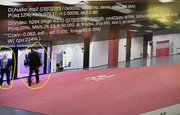
1. No user installed addons are supported, python or otherwise.
2. No, they really are not supported.
3. They are not coming back
4. Read from 1. again
Any mention of illegal streaming sites, addons or any pirated material will not be tolerated. This is not democracy and any offenders will be banned and posts deleted immediately without warning.
Other than that, we hope you enjoy MrMC so far and we welcome any input and feedback you might have.
Is it really true when also upsizing to 4K? I was just testing a 1080i music video clip which didn't look at all smooth with YADIFx2 enabled, I had to choose the other YADIF setting to make it look normal..
Is it really true when also upsizing to 4K? I was just testing a 1080i music video clip which didn't look at all smooth with YADIFx2 enabled, I had to choose the other YADIF setting to make it look normal..
Yes, it works well on some content. On other content it doesn't.
I'm trying to play 1080i50 H.264 streams(video: cca. 20mbit/s)
Yadiff2x is the best mode for me when video is H.264 4:2:0 top first, but picture is freezing when video is H.264 high4:2:2 (YUV 4:2:2-top first). Do you have any idea? How to solve this problem? Inverse BOB mode is always working, but it is not the best quality method to deinterlace sports events.
satfeed1 wrote: 16 Nov 2019, 22:34
Hello davilla and everyone!
I'm trying to play 1080i50 H.264 streams(video: cca. 20mbit/s)
Yadiff2x is the best mode for me when video is H.264 4:2:0 top first, but picture is freezing when video is H.264 high4:2:2 (YUV 4:2:2-top first). Do you have any idea? How to solve this problem? Inverse BOB mode is always working, but it is not the best quality method to deinterlace sports events.
I would guess it's maxing out the CPU with the high.
satfeed1 wrote: 16 Nov 2019, 22:34
Hello davilla and everyone!
I'm trying to play 1080i50 H.264 streams(video: cca. 20mbit/s)
Yadiff2x is the best mode for me when video is H.264 4:2:0 top first, but picture is freezing when video is H.264 high4:2:2 (YUV 4:2:2-top first). Do you have any idea? How to solve this problem? Inverse BOB mode is always working, but it is not the best quality method to deinterlace sports events.
I would guess it's maxing out the CPU with the high.
What is the maximum value? I see 200-240 percent CPU load.
satfeed1 wrote: 16 Nov 2019, 22:34
Hello davilla and everyone!
I'm trying to play 1080i50 H.264 streams(video: cca. 20mbit/s)
Yadiff2x is the best mode for me when video is H.264 4:2:0 top first, but picture is freezing when video is H.264 high4:2:2 (YUV 4:2:2-top first). Do you have any idea? How to solve this problem? Inverse BOB mode is always working, but it is not the best quality method to deinterlace sports events.
I would guess it's maxing out the CPU with the high.
What is the maximum value? I see 200-240 percent CPU load.
that's normal cpu usage with yadif then. it could be that that type of deinterlacing just isn't working well with that content. have you tried yadif and not yadif2x?
Yadif-half gives me 25frames/sec insted of 50frames/sec, but it is working with no problem. Unfortunately 25fps not so good for sporting events. I need 50fps with Yadif2x. Tomorrow I will upload a short video sample for you. What is the maximum CPU load?
satfeed1 wrote: 18 Nov 2019, 18:46
Yadif-half gives me 25frames/sec insted of 50frames/sec, but it is working with no problem. Unfortunately 25fps not so good for sporting events. I need 50fps with Yadif2x. Tomorrow I will upload a short video sample for you. What is the maximum CPU load?
actually, I think the maximum is something like 400 or 600. I forget, does it have 4 cores or 6 cores?
I'm just another user so I'm only giving advice. If you upload that'll be to the devs who may also have some answers of their own.